Benefits of Outsourcing Clipping Path Services for eCommerce
High-quality product photography is an essential part of running a successful eCommerce business. Customers rely on product images to examine details, compare options, and understand what they are purchasing. Clean backgrounds, accurate colors, and consistent product presentation can help create a more professional shopping experience. However, preparing hundreds or thousands of product images can be time-consuming. Removing backgrounds, refining product edges, and maintaining consistent image quality require specialized editing skills. Outsourcing clipping path services offers a practical solution for online retailers, photographers, and creative agencies that need professional image editing without having to manage every task internally. This guide explains clipping path services, their major outsourcing benefits, common techniques, Photoshop editing workflows, and how to choose a reliable provider for your eCommerce business.
What Is a Clipping Path Service?
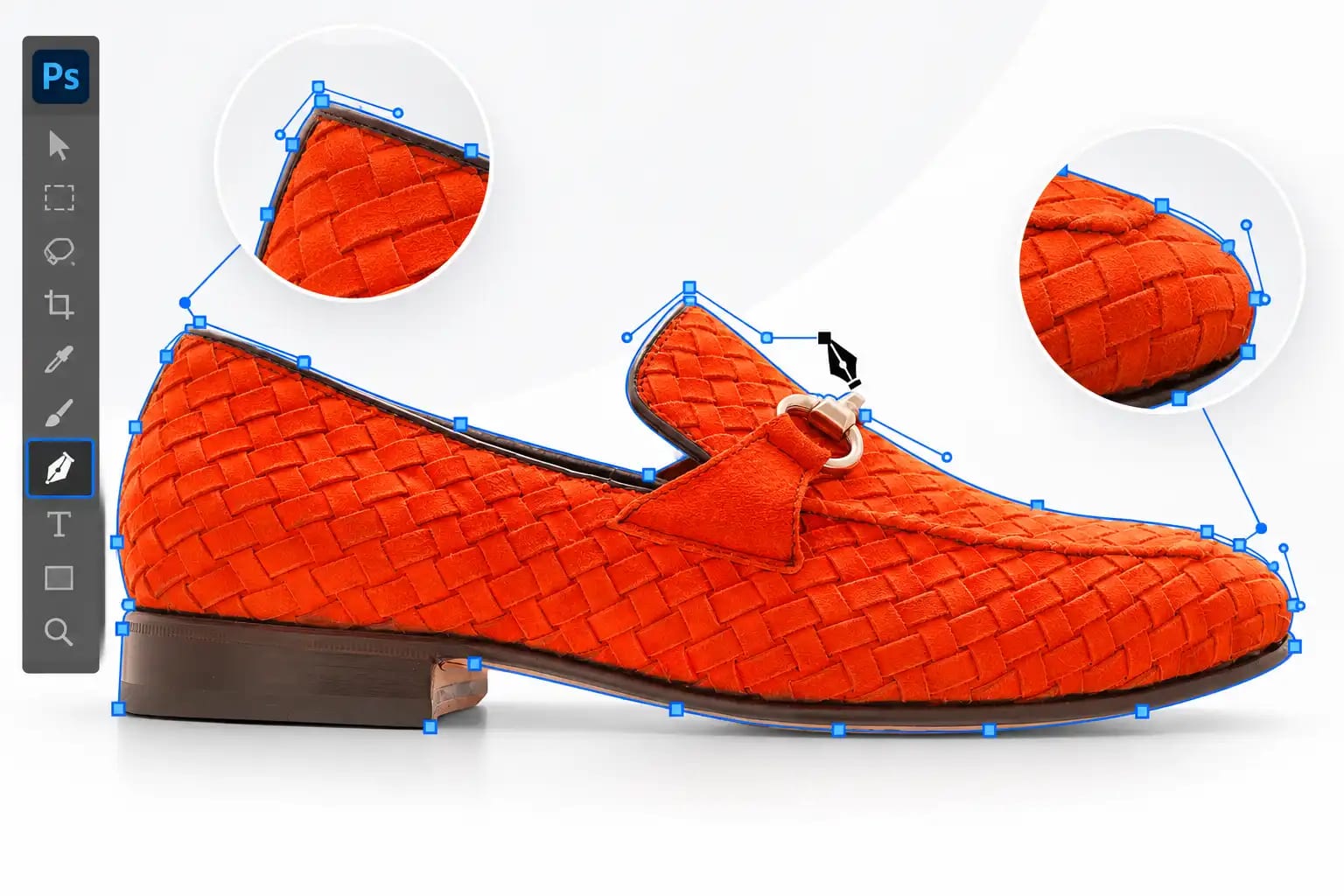
A clipping path service uses vector paths to isolate a product or object from its original image background. Professional editors commonly use the Pen Tool in Adobe Photoshop to draw a precise outline around a subject. The resulting path can be converted into a selection or vector mask, allowing the background to be hidden or replaced. Unlike a rough automatic selection, a carefully constructed manual path offers controlled, accurate edges around suitable objects. Clipping paths are frequently used for:
- Shoes, handbags, and fashion accessories
- Electronics and packaging
- Furniture and home products
- Product catalogs and online stores
- Advertising and marketing graphics
- Product background removal
For example, a handbag photographed against a cluttered background can be isolated and placed on a clean white background for an online product listing. Clipping paths work particularly well with clear, defined product edges. Subjects containing hair, fur, smoke, or transparency may require image masking instead.
Why Is Outsourcing Clipping Path Services Important?
eCommerce businesses often handle extensive product catalogs, seasonal collections, and frequent inventory updates. Each product may require multiple images showing different angles, colors, or details. Processing these photographs internally can create production delays, particularly when an editing team has limited capacity. Outsourcing allows businesses to delegate repetitive image-editing tasks to external specialists. This arrangement can help retailers focus on product sourcing, marketing, customer service, and sales while maintaining a structured image-preparation workflow. However, outsourcing is not automatically the best solution for every business. Its value depends on editing volume, project complexity, provider quality, pricing, and communication.
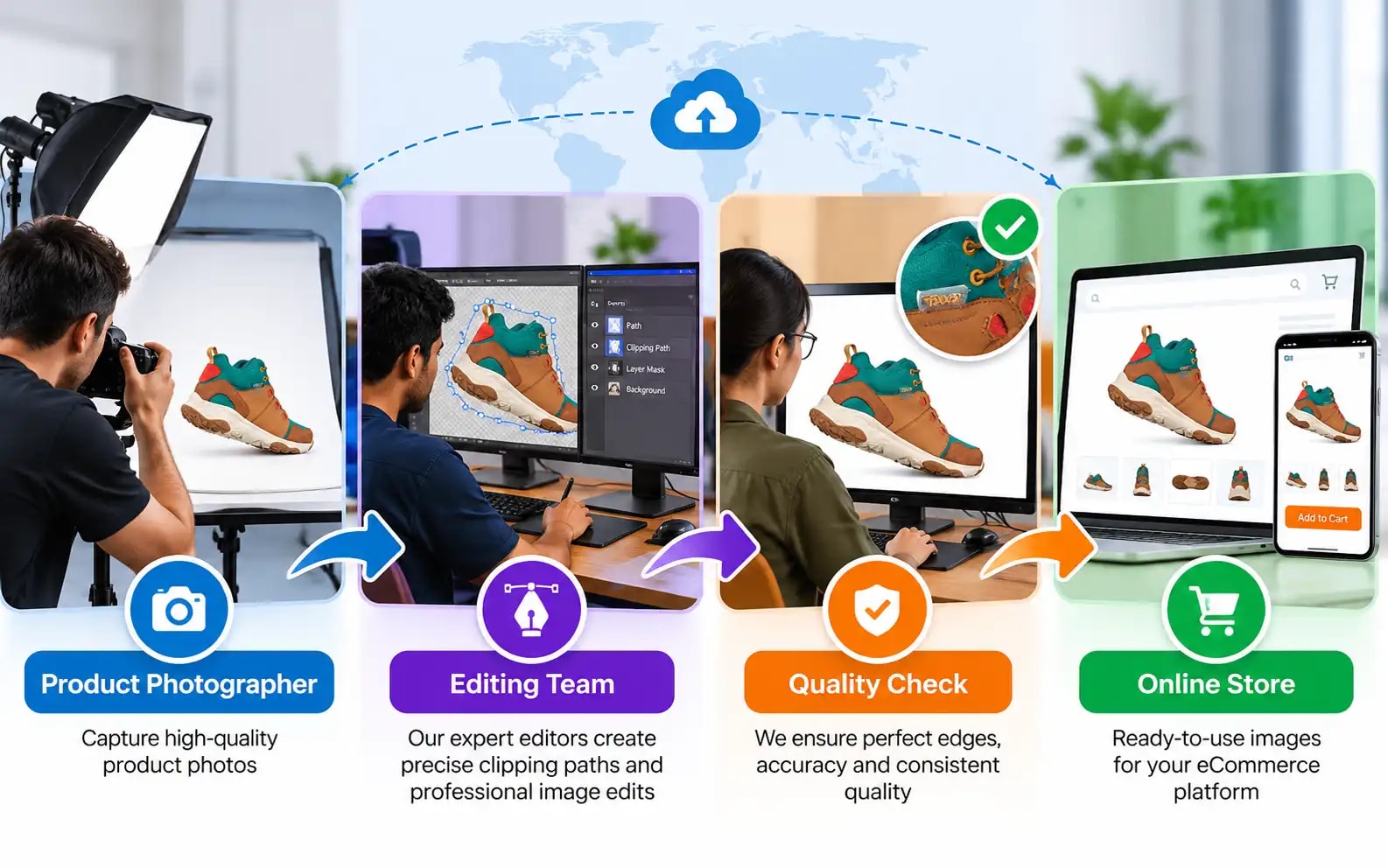
10 Benefits of Outsourcing Clipping Path Services
1. Save Valuable Time
Manual clipping path editing requires concentration and technical precision. An editor must trace product outlines, adjust curves, handle internal openings, and inspect the result for imperfections. When a retailer has hundreds of images to process, these tasks can occupy significant production time. Outsourcing allows internal employees to focus on other responsibilities while editing specialists prepare the images. For example, a footwear retailer launching a new collection could send product photographs for background removal while its marketing team prepares product descriptions and promotional materials. This approach can reduce internal editing workloads when file delivery, revisions, and communication are properly organized.
2. Manage Editing Costs More Flexibly
Maintaining an in-house editing team can involve salaries, training, software subscriptions, hardware, and ongoing management.
Outsourcing may offer an alternative pricing structure based on image quantity, complexity, or project requirements. This flexibility can be useful for businesses with seasonal or irregular demand for editing. Instead of maintaining additional permanent editing capacity, a company can purchase external editing services when needed. However, compare the full cost before deciding. Provider fees, revisions, internal quality checks, and communication time should all be considered. Cost savings are possible, but they depend on individual business circumstances.
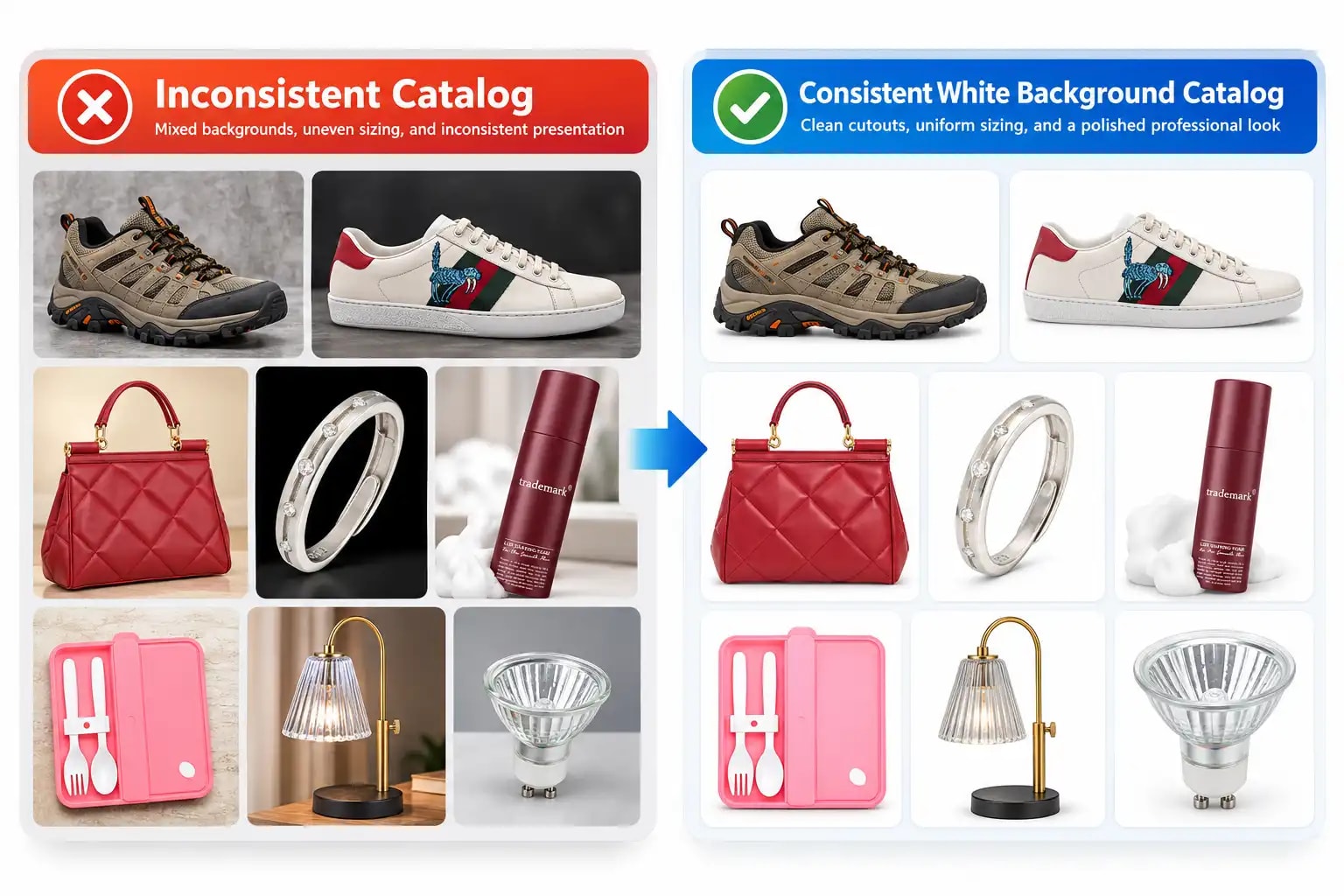
3. Maintain Consistent Product Image Quality
Visual consistency helps online stores present products in an organized way. Inconsistent backgrounds, cropping, product scale, and shadow styles can make a catalog appear uneven. A professional editing provider can follow a detailed style guide covering:
- Background colors
- Product alignment and scale
- Image dimensions
- Cropping requirements
- Shadow treatment
- Edge accuracy
- Output formats
When these requirements are applied consistently, product images can appear more cohesive across category pages.
The quality of the results still depends on clear instructions and proper review.
4. Access Specialized Photoshop Skills
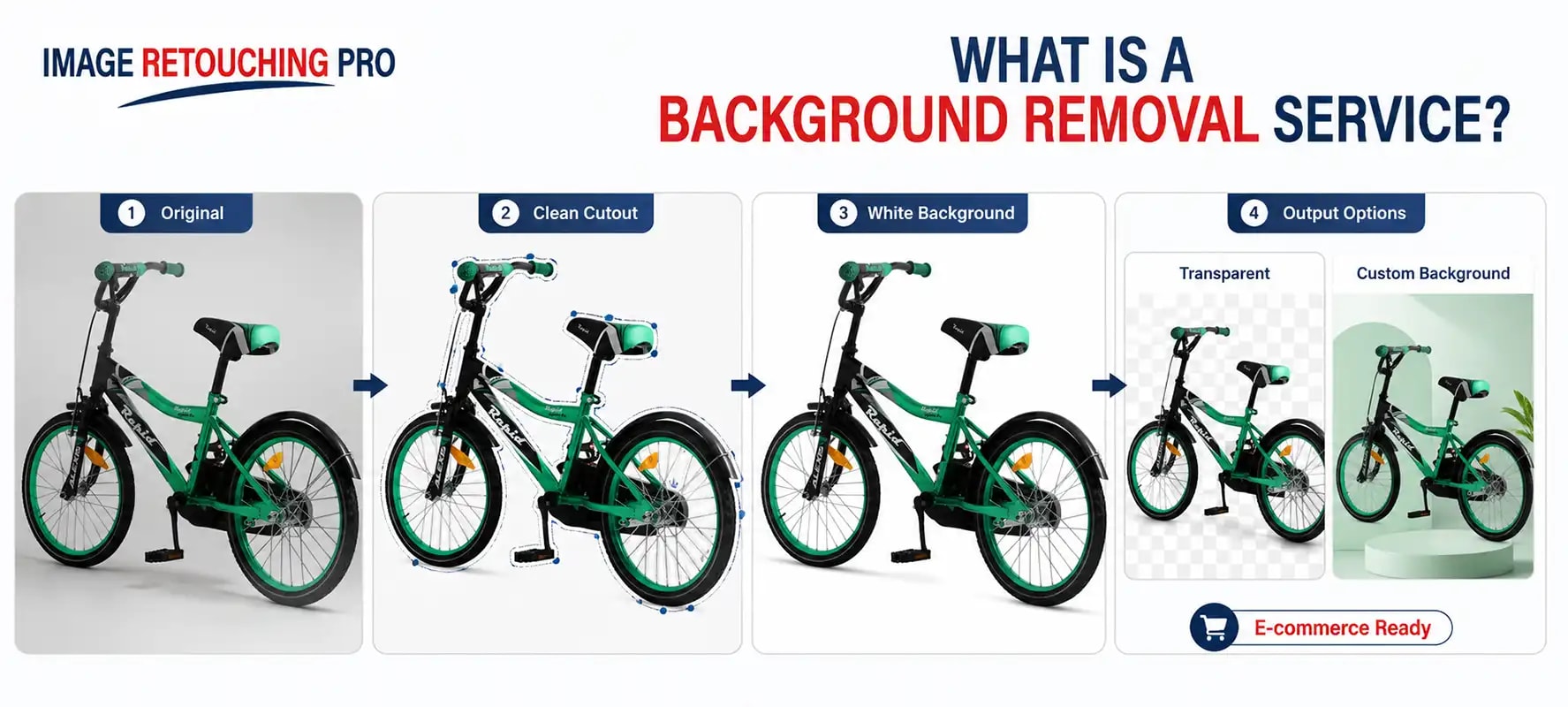
Accurate clipping paths require knowledge of anchor points, Bézier curves, vector paths, selections, and masks. Experienced editors understand how to preserve product shapes while removing unwanted backgrounds. For example, creating a path around a simple rectangular box is different from isolating a bicycle containing curved tubes and internal openings. An external editing specialist may have experience with different levels of complexity. This can be beneficial for businesses that lack dedicated Photoshop professionals.
5. Handle Large Product Image Volumes
Retailers may need extensive photo editing when launching new products or updating an existing catalog. Bulk editing presents challenges involving file organization, consistent quality, revisions, and delivery schedules. An outsourcing provider with suitable capacity may help businesses manage these projects. Before sending a large order, confirm the number of images the provider can process, the expected delivery schedule, and the quality-control procedure. A small test batch is useful for identifying possible issues before full production begins.
6. Improve Product Presentation
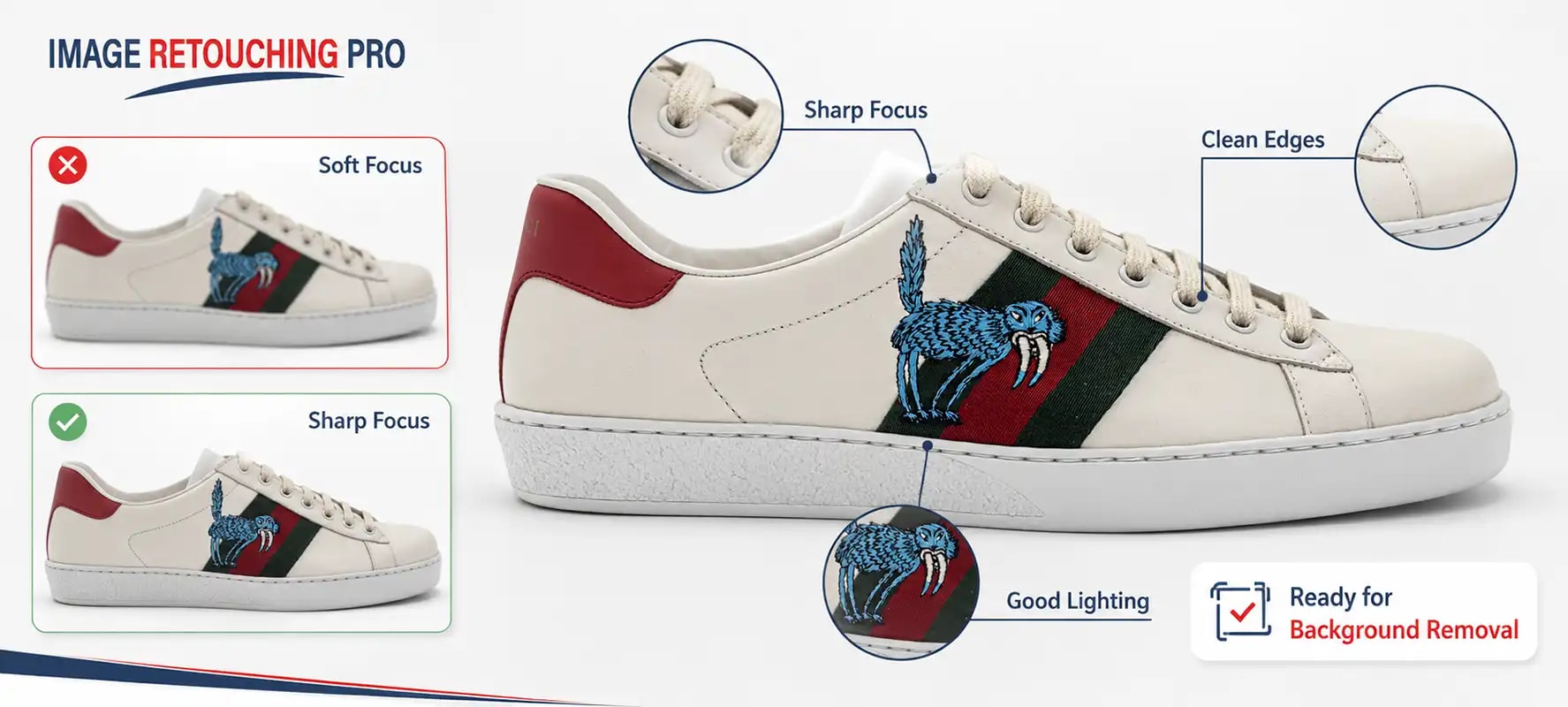
Clean product backgrounds remove unnecessary visual distractions and help customers focus on the item. For example, a professionally isolated sneaker can show its overall shape, sole, materials, and design more clearly. Background removal can also make a product catalog look more consistent. However, editing should preserve accurate product characteristics. Excessive changes to color, texture, shape, or condition may mislead customers. The objective is to present products clearly and professionally, not to alter their essential characteristics.
7. Prepare Images for Multiple Marketing Channels
Businesses often use product photographs across websites, advertising campaigns, social media, and printed catalogs. A properly isolated product can be incorporated into different layouts without repeating the entire photography process. An eCommerce business might require a white-background JPEG for a product listing, a transparent PNG for a promotional design, and an editable PSD for future adjustments. Each platform may have its own requirements for dimensions, backgrounds, and file formats.
Outsourcing can help prepare reusable product assets, although additional design work may still be required.
8. Reduce Internal Production Pressure
Photo editing workloads can fluctuate throughout the year. During a seasonal campaign, a retailer may need substantially more images than usual. External editing support can help manage these periods without requiring the company to assign every task to its internal team. Businesses can also use a hybrid approach. For example, internal staff may approve the visual style and perform final quality checks while outsourcing repetitive clipping path production. This maintains internal oversight while providing additional editing capacity.
9. Support More Efficient Product Launches
Launching new products involves photography, inventory updates, descriptions, pricing, website preparation, and marketing.
Image processing is one part of this larger workflow. When a business has a dependable outsourcing arrangement, background removal can progress alongside other launch activities. For example, while external editors prepare product cutouts, the retailer can finalize product pages and marketing materials. Actual turnaround depends on image complexity, workload, provider availability, and revisions. Deadlines should always be confirmed in advance.
10. Focus on Core Business Activities
Most eCommerce businesses specialize in selling products rather than providing image editing services. Product development, customer relationships, inventory management, and advertising often require substantial attention. Outsourcing selected editing tasks can free internal resources for these activities. The greatest benefit comes from a clear division of responsibilities, in which the business defines its quality standards and the provider handles the agreed-upon production tasks.
Types of Clipping Path Services
Different products require different path construction techniques.
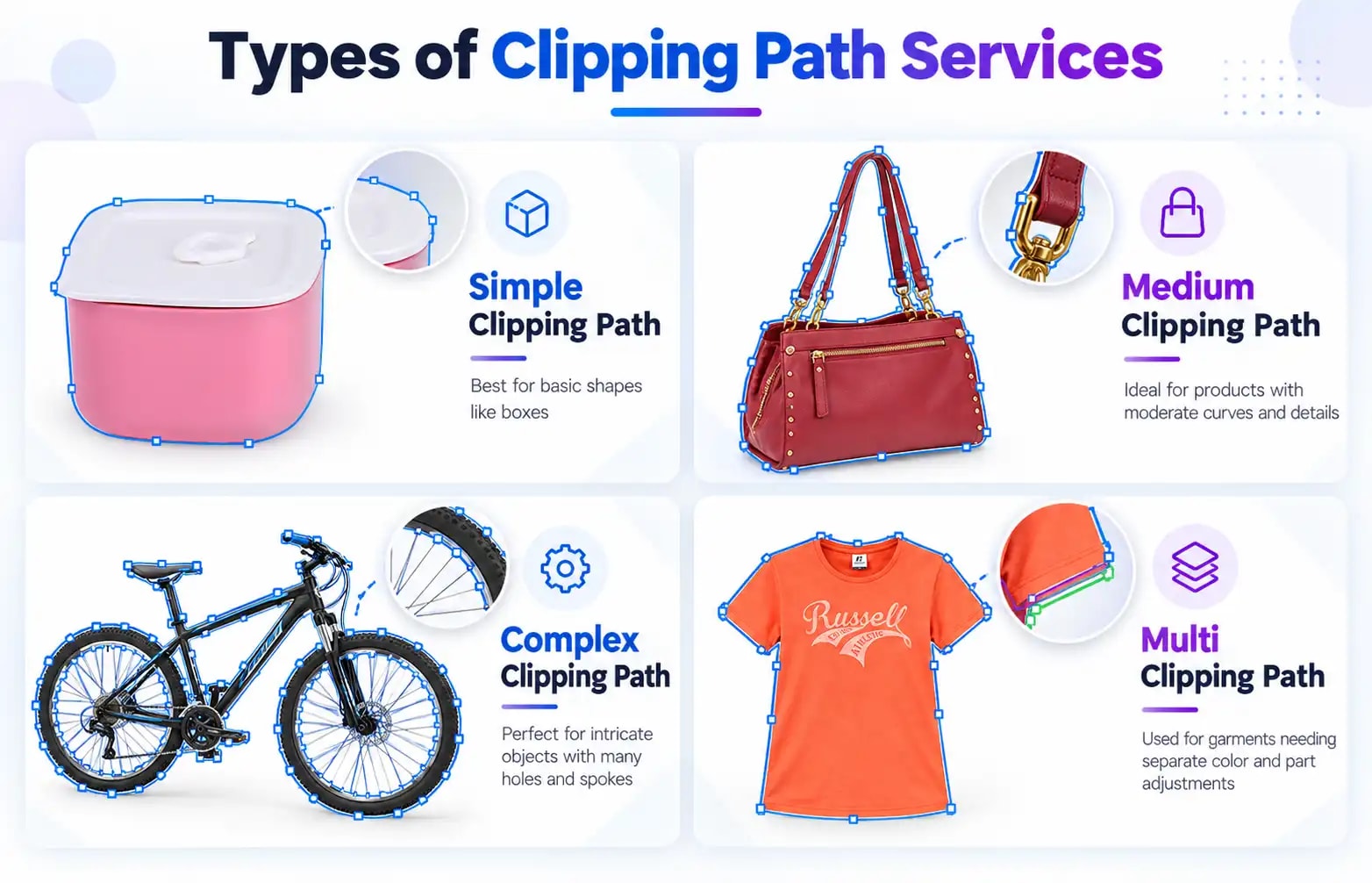
Simple Clipping Path
Simple clipping paths are suitable for products with straightforward edges and limited curves. Examples include books, boxes, basic packaging, and simple rectangular objects.
Medium Clipping Path
Medium-complexity paths involve additional curves, openings, or overlapping components. Examples include handbags, footwear, and some furniture products.
Complex Clipping Path
Complex clipping paths require more detailed tracing and careful handling of intricate shapes. Products such as bicycles, machinery, or furniture with numerous openings may fall into this category.
Multi Clipping Path
Multi-clipping path editing uses separate paths for different sections of an object. For example, different parts of a garment can be isolated for selective color adjustments. This technique is useful when individual product components require separate editing.
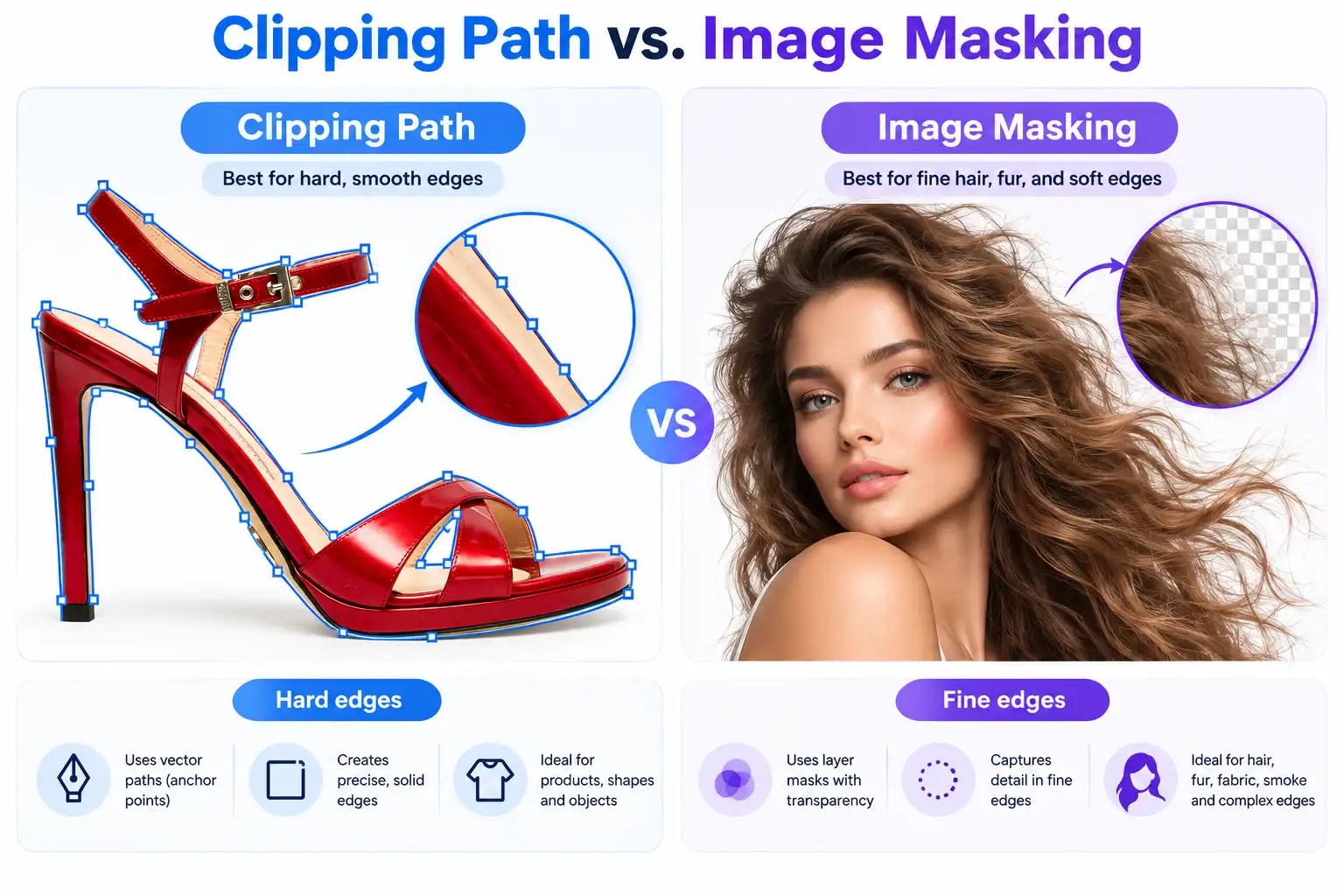
Clipping Path vs. Image Masking
Clipping paths are best suited to clearly defined boundaries. Image masking is often more appropriate for subjects with fine, soft, or partially transparent edges. For example, a shoe may be suitable for a Pen Tool clipping path, while a model's flowing hair may require a detailed layer mask. Both methods can be combined when necessary.
How Professional Editors Create Clipping Paths in Photoshop
A typical professional clipping path workflow includes several stages.
Step 1: Inspect the Original Photograph
The editor examines product boundaries, internal openings, image quality, and areas requiring additional corrections.
Step 2: Select the Pen Tool
In Adobe Photoshop, the Pen Tool can create vector paths with accurate straight segments and curves. The editor works in Path mode to outline the product.
Step 3: Trace the Product
Anchor points are positioned around the object's edges. Direction handles control curves, allowing the editor to follow rounded or irregular hard-edged shapes.
Step 4: Refine the Path
The editor checks whether the path accurately follows the product. Additional path components may be needed for holes, openings, or separate sections.
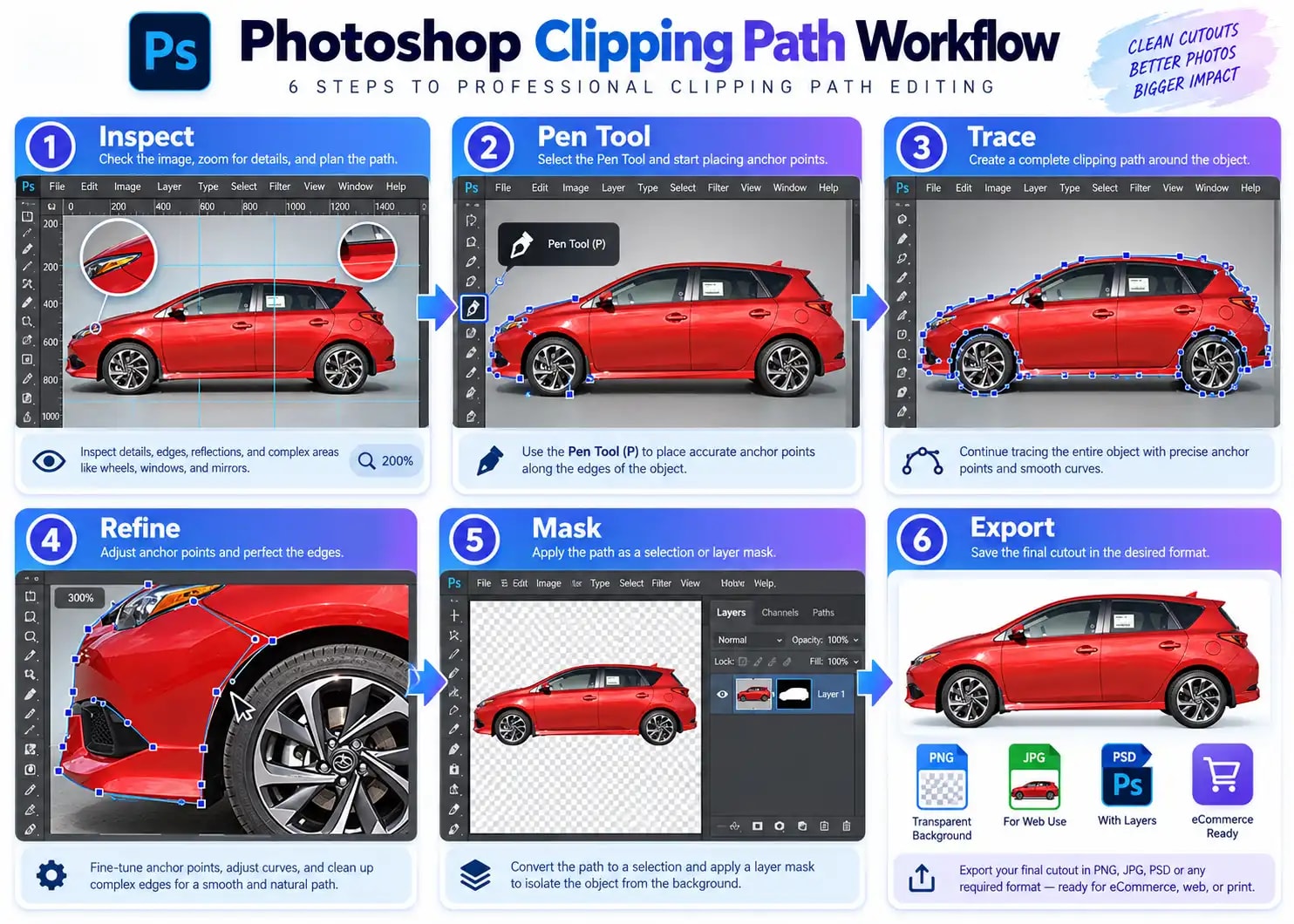
Step 5: Create a Selection or Mask
The path can be converted into a selection or used with a vector mask to hide unwanted background areas.
Step 6: Inspect and Export
The editor checks for edge defects, missing details, unwanted halos, and background inconsistencies. The image is then exported according to the client's requirements. JPEG is commonly used for opaque product images, while PNG supports transparency. Editable PSD files may be provided when required. For technical documentation,
drawing paths with the Pen Tool
.
Which Businesses Benefit From Clipping Path Outsourcing?
eCommerce Retailers
Online stores often require consistent product photographs for large catalogs. Clipping paths help prepare product cutouts suitable for standardized backgrounds.
Professional Photographers
Product photographers can outsource repetitive cutout tasks while focusing on lighting, composition, and creative production.
Fashion and Apparel Brands
Fashion retailers may require clipping paths for clothing, accessories, footwear, and promotional images. Some apparel projects also require ghost mannequin editing or advanced masking.
Jewelry Businesses
Jewelry photographs sometimes require paths around individual components. However, detailed jewelry retouching may additionally involve reflection control, dust removal, masking, and color correction.
Advertising Agencies
Creative agencies use isolated product images in advertising layouts, banners, promotional materials, and digital campaigns. Clean cutouts allow designers greater flexibility when arranging visual elements.
How to Choose a Reliable Clipping Path Outsourcing Company
Selecting a suitable provider involves more than comparing prices.
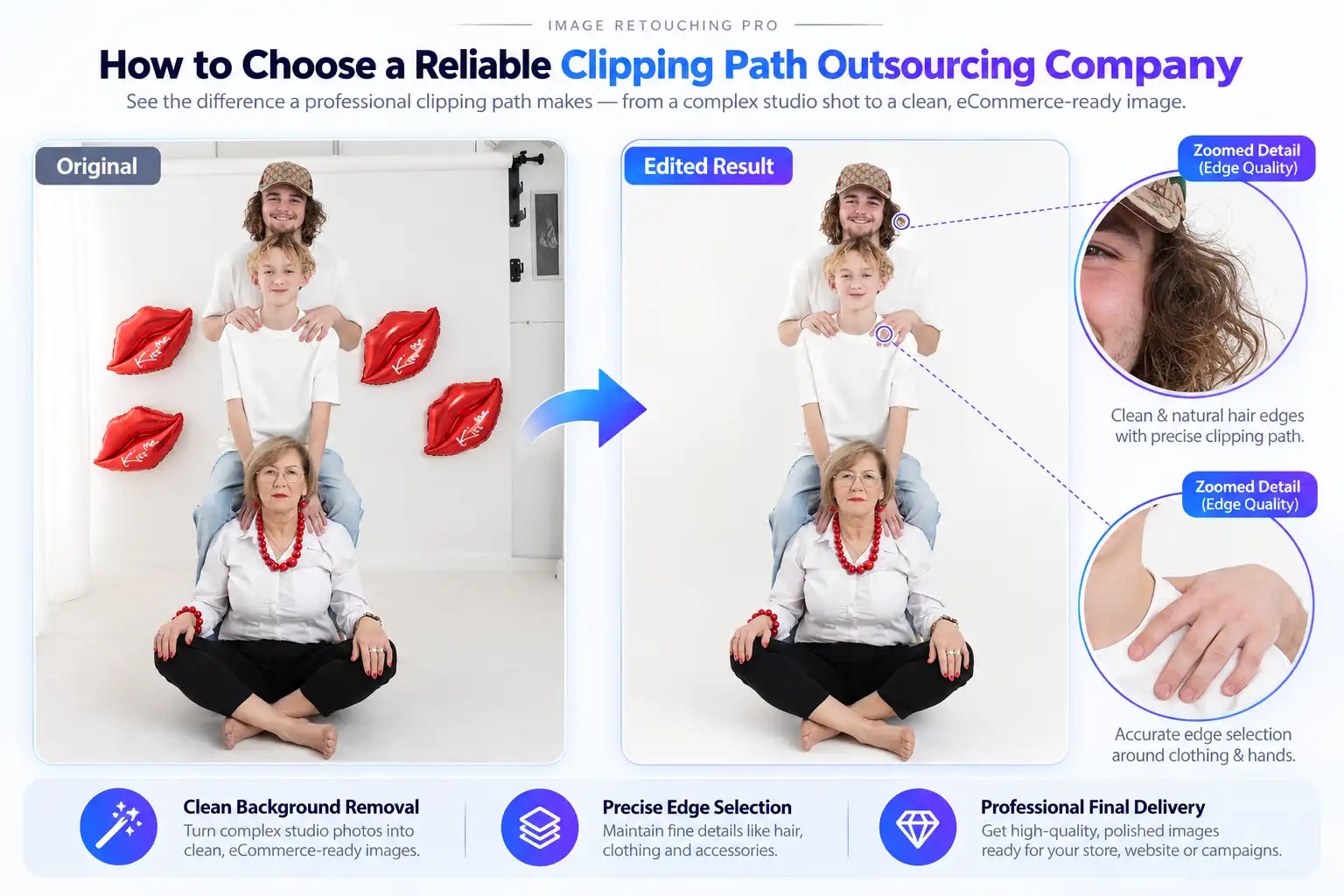
Review portfolio samples. Examine product images similar to your own. Look for accurate outlines, preserved details, and clean backgrounds.
Request a sample edit when available. A representative test image can help evaluate the provider's understanding of your requirements.
Compare pricing carefully. Ask whether quotations include background replacement, multiple paths, specific file formats, and revisions.
Confirm delivery expectations. Share the image count and required deadline before production begins.
Discuss file security. Confidential product launches and unpublished campaign images may require secure transfers and appropriate confidentiality arrangements.
Check communication and revision policies. Clear feedback procedures help resolve editing issues efficiently.
Best Practices for Successful Outsourcing
A detailed editing brief is important for maintaining consistent quality. Before submitting a project, prepare the necessary specifications.
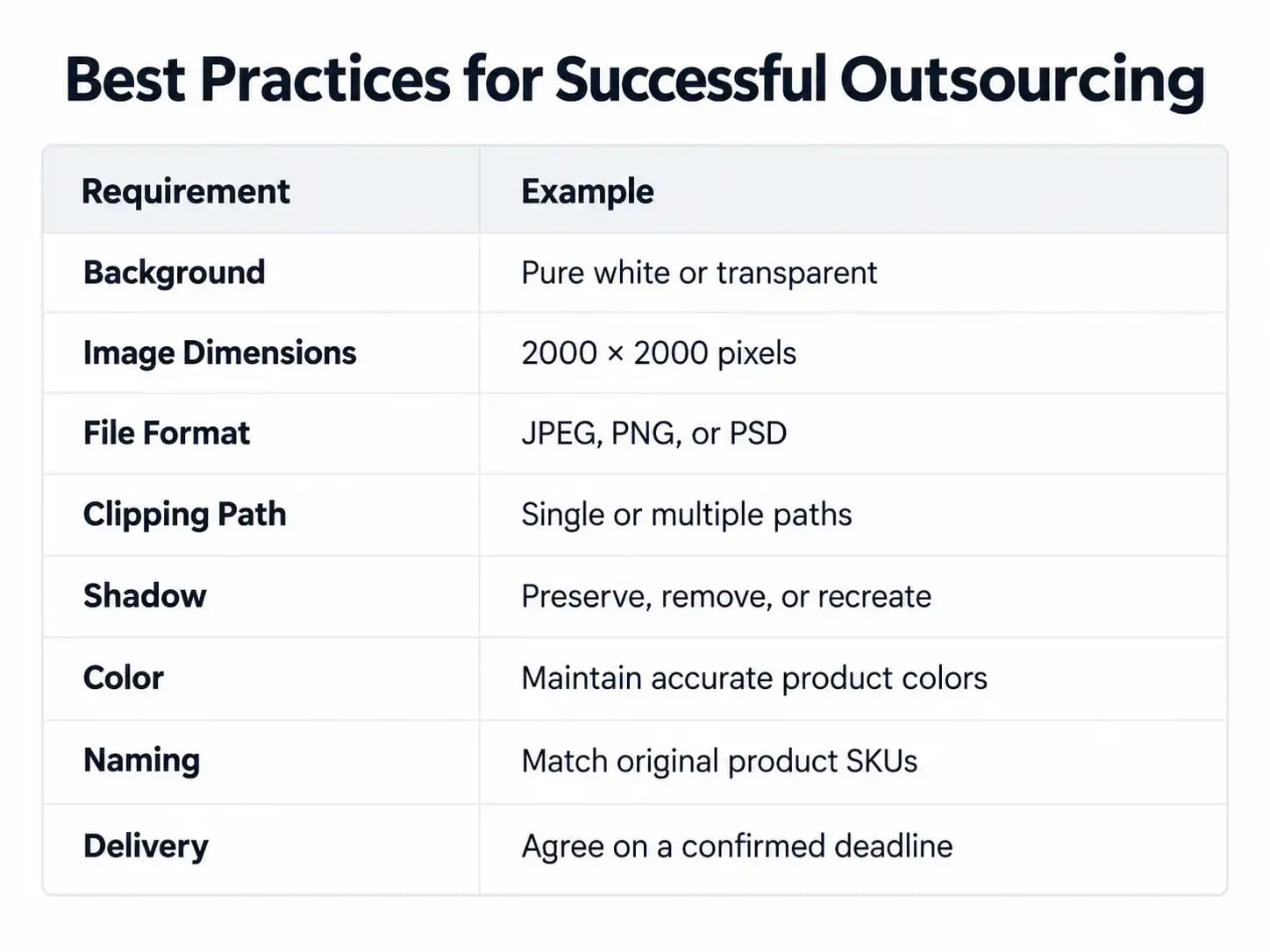
For large orders, consider approving a small sample batch before processing the remaining files.
After delivery, inspect images at normal viewing size and higher magnification. Look for rough edges, missing components, unexpected color changes, or inconsistent product placement. A well-defined review process reduces confusion and unnecessary revisions.
Common Outsourcing Mistakes to Avoid: Choosing Only by Price:
A low editing fee may not be worth it if images require extensive corrections. Evaluate accuracy, reliability, communication, and total project costs.
Providing Unclear Instructions
Instructions such as "remove the background" may be insufficient for complex projects. Specify whether shadows should remain, which components must be included, and how the final images should look.
Using Clipping Paths for Every Subject
Clipping paths do not work equally well for every edge type. Hair, fur, lace, glass, and other difficult materials may require image masking.
Skipping Quality Control
Outsourced images still need inspection. Review product boundaries, file formats, dimensions, and consistency before uploading them to an online store.
Frequently Asked Questions
1. Is outsourcing clipping path services cost-effective?
It can be. Businesses with recurring or bulk editing requirements may avoid some costs associated with additional in-house editing capacity. Actual savings depend on project volume, complexity, provider fees, and revision requirements.
2. Can I outsource hundreds or thousands of images?
Yes. Some professional editing providers have workflows designed for bulk image processing. Confirm production capacity, deadlines, and quality standards before submitting a large order.
3. How long does clipping path outsourcing take?
Turnaround varies according to image quantity, object complexity, editing requirements, and provider availability. Obtain a confirmed schedule before starting a project.
4. Can outsourcing companies handle complex clipping paths?
Experienced editors can create paths around many detailed, hard-edged objects. For subjects involving hair, fur, or transparency, image masking may be a better technique.
5. Can I request a free trial?
Some clipping path providers offer sample edits or trial projects. Ask about availability, image limits, and any applicable conditions before submitting files.
6. Is clipping path outsourcing suitable for eCommerce stores?
Yes. It can help online retailers create consistent product images and manage recurring editing workloads. Final images should comply with the requirements of each marketplace or website.
7. What should I provide to a clipping path service provider?
Supply high-quality source files, clear editing instructions, background requirements, output dimensions, file formats, reference images, and the desired delivery schedule.
Conclusion: Is Outsourcing Clipping Path Services Worth It?
Outsourcing clipping path services can help eCommerce businesses, photographers, and agencies manage product image editing more efficiently. The key advantages include reducing internal editing workloads, accessing specialized skills, improving image consistency, handling bulk projects, and preparing reusable product cutouts. However, successful outsourcing depends on selecting a suitable provider, communicating clear requirements, and carefully reviewing completed images. Businesses should evaluate their image volume, editing complexity, available resources, and budget before choosing between internal production and outsourcing.
Explore Professional Clipping Path Services
Image Retouching Pro offers clipping path, background removal, image masking, and product photo editing services for photographers, online retailers, and creative businesses. If you need professional image editing support for your next product photography project, explore our services and discuss your specific editing requirements.
https://www.imageretouchingpro.com/services/background-removal-service